Your documentation only tells part of the story when lesion locations are recorded as free-text notes or flat diagrams. Missed details cost time during follow-ups, create ambiguity for referring clinicians, and leave gaps that matter during audits.
Body mapping in dermatology software addresses that problem by connecting every finding to a precise anatomical location on a digital model of the patient's body.
This article covers what body mapping means in a dermatology EHR context, how it differs from consumer mole mapping content you'll find elsewhere online, and why the distinction matters for your practice's documentation accuracy, follow-up workflows, and clinical decision-making.
Key Takeaways: Understanding Body Mapping in Dermatology Software
- Body mapping in dermatology software ties each lesion to a precise anatomical location on a digital model for consistent documentation.
- It differs from consumer mole mapping by integrating clinical notes, billing codes, imaging, and pathology results in one record.
- Longitudinal lesion tracking across visits supports earlier detection of changes and more informed biopsy decisions.
- Ezderm's 3D Body Map connects over 3,000 SNOMED-linked locations directly to the progress note and coding workflow.
- Accurate body mapping reduces ambiguity in follow-up documentation and strengthens audit-ready records.
What Is Body Mapping in Dermatology Software?
Body mapping is the ability to document, track, and visualize skin findings on a digital representation of the human body. In a dermatology EHR, each finding gets pinned to a specific anatomical location and connected to clinical notes, diagnoses, photos, pathology results, and billing codes.
This isn't the same as consumer-facing "mole mapping" content on patient education sites. That term refers to baseline photography for monitoring suspicious moles over time.
Body mapping in a practice-level EHR goes deeper: it builds a structured clinical record that links location data to every downstream workflow, from coding to follow-up scheduling.
How Does Body Mapping Differ from General Mole Mapping?
General mole mapping, as described on patient-facing sites, focuses on taking photographs of a patient's moles and tracking visible changes between visits. The audience is the patient. The goal is awareness.
Body mapping in dermatology EHR software is built for clinicians. The goal is documentation accuracy, coding precision, and workflow continuity. Each tagged lesion connects to the progress note, pathology records, clinical images, treatment history, and billing data in one structured chart entry.
That distinction matters because a flat photo comparison can't generate ICD-10 codes, trigger follow-up reminders, or create audit-ready records. A body map integrated into your EHR can.
Why Does Lesion Tracking Need Anatomical Precision?
Dermatology practices document dozens of findings per day across patients with complex histories. When a lesion's location is described only in free text ("left arm" or "upper back"), follow-up visits introduce ambiguity. Which lesion on the left arm? How far from the one biopsied last quarter?
Anatomically precise body mapping removes that ambiguity. Each finding is pinned to a specific coordinate, and the record persists across visits. When a patient returns, the prior map and all associated notes, photos, and pathology results are immediately accessible.
A 2025 randomized clinical trial published in JAMA Dermatology found that structured photography and sequential imaging in high-risk patients increased the detection of keratinocyte cancers and supported more targeted follow-up decisions compared to standard care alone.
How Clinical Imaging Connects to Body Maps in Dermatology Documentation
Photos taken outside the EHR create extra steps and documentation gaps. When clinical images are captured separately and stored in a general folder, there's no automatic link between the image, the specific lesion, and the patient's chart.
In a dermatology-specific EHR with integrated body mapping, images attach directly to the lesion site on the map. Each photo connects to the corresponding progress note, pathology results, and treatment history. Over time, the photo timeline gives you a visual record of every mapped site across multiple visits.
That connection matters for surgical dermatology workflows too. Mohs cases, biopsies, and excision documentation all benefit from having the image tied to the exact mapped location, not just filed in a generic gallery.
What Makes a 3D Body Map Different from a 2D Skin Diagram?
A standard 2D skin diagram is a flat outline of the human body. You click a general area to place a marker. For a practice seeing 30+ patients per day with complex lesion histories, that level of precision isn't enough.
A 3D body map lets you zoom, rotate, and pinpoint locations that 2D diagrams miss entirely: behind the ear, between the fingers, inside the mouth, the scalp.
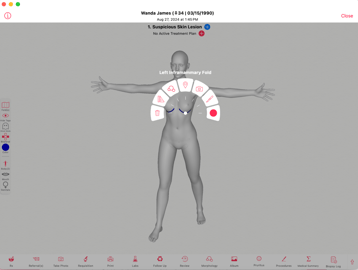
Ezderm's 3D Body Map includes more than 3,000 SNOMED-linked anatomical locations. It supports Fitzpatrick scale integration, ghost mode for complex cases, and both point and dermatome mapping.
What matters is that the map isn't a standalone tool. It lives inside the encounter itself, connected to the HPI, the clinical note, the coding engine, and the photo timeline. No screen switching. No importing from a separate system.
How Body Mapping Supports Billing Accuracy in Dermatology Practices
Coding errors in dermatology often trace back to imprecise location documentation. When a lesion's anatomical site is vague, the ICD-10 code generated from that note carries the same vagueness, and claims built on vague codes are more likely to be denied or flagged for audit.
Body mapping ties each finding to a precise location, and a dermatology-specific EHR can generate ICD-10 and CPT codes directly from that mapped data.
Ezderm's coding engine pulls location, diagnosis, and treatment plan data from the 3D Body Map and the clinical documentation tied to it, reducing the manual steps between charting and claim submission.
Fewer manual coding steps means fewer transcription errors, fewer denials, and cleaner claims from the start.
What Should Dermatology Practice Owners Look for in Body Mapping Software?
If you're evaluating EHR platforms and body mapping is on your list, a few specifics are worth checking during a demo:
- Is the body map built into the progress note, or does it live in a separate module that requires screen switching?
- Does each mapped finding link to clinical notes, photos, pathology, and billing codes automatically?
- Does the map support longitudinal tracking so you can compare findings across visits without digging through old charts?
- Are anatomical locations mapped to structured vocabularies (SNOMED, ICD-10) for consistent coding?
- Can clinical images be attached directly to a specific lesion site, or are they stored in a general patient record?
A body map bolted onto a general EHR works differently than one built into a dermatology-specific platform from the ground up. That distinction shows up in documentation speed, coding accuracy, and how much manual rework your staff handles after each visit.
A Note for Ezderm Users
Ezderm tracks every finding through the 3D Body Map, which is built directly into the Ezehr progress note. Each tagged lesion connects to the clinical documentation, photo timeline, pathology log, malignancy record, and automated coding engine.
If you're running Mohs cases, the surgical sites are documented using the same mapped anatomy. For ongoing skin surveillance patients, prior HPI findings and map tags auto-populate into follow-up encounters.
Reach out to your Ezderm client specialist if you have questions about maximizing the 3D Body Map in your current workflows.
Choosing Dermatology Software with Built-In Body Mapping
Documenting lesion locations accurately doesn't require a new clinical workflow. It requires an EHR that connects the mapping step to every other part of the chart: notes, photos, pathology, coding, and follow-up scheduling.
For practice owners comparing dermatology EHR platforms, the body mapping feature is one of the clearest indicators of whether a system was built for your specialty or adapted from a general template.
Want to see how Ezderm's 3D Body Map connects to your clinical and billing workflows? Schedule a demo or explore the product page.