
Dermatology Practice Management
Ezderm’s practice management for dermatology clinics provide you with all the tools necessary to manage the business side of your practice with ease—from scheduling to billing to reporting, and more!
Ezderm’s practice management (PM) system is tightly integrated with the EHR, functioning as a single unified platform where clinical and administrative workflows share the same data in real time—no bridges or duplicate entry required.
| Consistent data | Changes in appointments, patient info, or billing instantly reflect across all modules, keeping data consistent. |
| Reduced duplication and errors | Our unified dermatology software reduces duplicate records and manual errors in transcribing information. |
| Streamlined communication | Clinical, front-office, and billing teams all work off the same up-to-date information. |
| Automated superbill | Documentation creates a digital superbill, sending diagnoses and procedures from the EHR straight to the PM for claim processing. |
| Reduced support overhead | With only one platform to manage all your practice needs, there is less support overhead and IT management. |
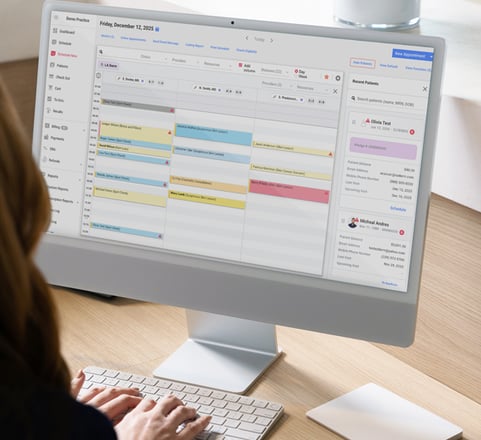
Ezderm’s dermatology scheduler is built for practices where every appointment slot matters, minimizing no-shows, streamlining workflows, and ensuring providers, rooms, and equipment are efficiently managed.
| Waitlist management | Move patients from the waitlist into canceled slots automatically, keeping provider schedules full and revenue steady. |
| Color-coded statuses | Instantly see who’s confirmed, checked in, canceled, or no-show for a better patient flow. |
| Customizable views | Filter by provider, clinic, or resource, or view them all at once, with side-by-side views for multiple providers. |
| Quick-add appointments | Double-click to schedule with prefilled provider and clinic info. |
| Resource scheduling | Schedule providers and shared equipment (like rooms or lasers) in one view, with options to block the calendar for holidays, closures, or PTO. |
| Recurring appointments and series | Book repeated visits or resource blocks in a single step to simplify long-term care. |
Turn data into action with reporting tools built for dermatology practice management. Ezderm’s dermatology PM reports give real-time visibility into revenue, A/R, productivity, and compliance.
| Financial tracking | Daily and monthly revenue by provider, payment type, or location. |
| A/R and denials | Aging reports with denial reason codes for faster resolution. |
| Compensation reports | Split collections by provider, service, or product for accurate pay. |
| Billing oversight | Charges, adjustments, and payments displayed side by side. |
| Follow-up & recalls | Identify patients due for care based on diagnosis or recall type. |
| Inventory sales reports | Track cosmetic and retail sales alongside stock levels. |
| Hard close periods | Lock reports for audit-ready accuracy. |
| Saved templates | Save and reuse custom reports for recurring workflows. |
| Audit logs | Track who ran reports and apply role-based access for security. |
Prevent denials before they happen with automated eligibility checks built into Ezderm’s dermatology PM.
| Real-time verification | Confirm active coverage at scheduling or check-in. |
| Batch eligibility runs | System re-validates upcoming appointments to catch terminated or changed plans. |
| Benefit details | See co-pay, deductible, and coverage limits before the visit. |
| Denial prevention | Reduce claim rejections caused by inactive insurance or missing policy data. |
Billing for dermatology practices is simplified with Ezderm’s integrated electronic claim submission capabilities.
| Batch submission | Send multiple claims at once—no manual, one-by-one entry. |
| Claim status tracking | Monitor claims in real time with clear status buckets (ready, pending, denied, rejected, patient responsibility, completed). |
| Clearinghouse Integration | Submit electronically through Availity without duplicate data entry. |
| Error prevention | Claim scrubber flags missing IDs, inactive insurance, or invalid codes before submission. |
Signed clinical notes from the EHR automatically flow into Ezderm’s practice management billing system as complete, scrubbable encounters.
| Automatic encounters | Every signed note generates a billing-ready encounter with CPT/ICD-10 codes. |
| Claim scrubbing tools | Pre-flags missing payers, inactive plans, and incomplete codes before submission. |
| Modifier automation | Common modifiers applied automatically; billers can add others, such as JZ, JW, e-modifiers. |
| Provider-to-biller messaging | Billers and providers can exchange To-Do’s and notes to ensure claims are accurate before submission. |
Ezderm’s dermatology PM automates payment posting, saving billers hours each week and ensuring clean ledgers.
| ERA auto-posting | Import and apply payments line-by-line automatically, including pre-collected copays. |
| Manual EOB posting | Enter insurance payments, deductibles, and adjustments for non-ERA payers with full accuracy. |
| Advance credits | Unapplied patient credits are flagged and held until properly assigned, preventing billing confusion. |
| Recoupments | Negative ERA lines (“takebacks”) are posted against the correct date of service, ensuring audit-ready accuracy. |
Ensure billing for dermatology practices is always accurate the first time with customizable fee schedules and rules.
| Custom fee schedules | Build Medicare-based or custom CSV imports for payer-specific or self-pay pricing. |
| Provider-level rules | Assign NPIs, Tax IDs, and payer-specific overrides at the provider or group level. |
| Cosmetic billing separation | Cosmetic and product charges live in a dedicated module, preventing accidental insurance billing. |
| Private insurance lists | Limit staff to in-network options, reducing payer selection errors. |
Ezderm’s dermatology PM includes inventory tools to track, manage, and bill for every product dispensed.
| Clinic-level tracking | Monitor product levels by location in real time and prevent shortages by knowing exactly what’s available. |
| Clinical integration | Link products to treatment plans so sales flow into checkout automatically, reducing manual steps while ensuring billing and stock accuracy. |
| Cosmetic & retail tracking | Manage medical, cosmetic, and retail revenue streams together. |
| Revenue protection | Automated tracking prevents revenue leakage and ensures every dispensed product is billed and deducted from stock. |
Ezderm’s checkout module streamlines all payment and product workflows, supporting medical, cosmetic, and retail transactions in one place.
| Consolidated payments | Accept co-pays, deductibles, product sales, cosmetic services, and balances in one transaction, with support for multiple payment types. |
| Product & item sales | Add retail items or procedures, apply discounts, mark taxable items, and credit sales to the right provider. |
| Gift cards & packages | Sell and redeem gift cards or apply package credits directly to patient accounts. |
| Balance application | Apply payments to specific dates of service; reconcile once EOBs are posted; SMS “text to pay” links apply directly to balances. |
| Checkout flexibility | Process payments before or after notes are finalized, with patient status tracking for smooth handoffs. |
| Financial accuracy | Statements show only true balances after adjudication, while credits remain visible but not misrepresented as amounts due. |
Ezderm’s built-in dermatology collection tools reduce patient aging and improve cash flow with structured workflows that keep balances visible and manageable.
| Streamlined statement management | Generate and send patient statements directly from the dermatology PM, either as a batch or individually. |
| Tracking buckets | Organize accounts into pre-collections or collections for targeted follow-up, and batch-move accounts between statuses for efficient processing. |
| Chart alerts | Flag accounts with overdue balances directly in the patient chart or during scheduling and visits, making balances harder to overlook. |
| Consistent follow-up | A structured workflow reduces A/R over time and tracks how many statements have been sent and when. |
Refund workflows in Ezderm ensure both patients and insurers receive accurate reimbursements, while keeping ledgers balanced and audit-ready.
| Integrated refund tracking | Manage patient and insurance refunds directly within the system, and link each refund to the original charge for transparency. |
| Detailed reporting | Run refund reports by provider, clinic, or service type to identify trends, such as recurring payer adjustments or duplicate payments. |
| Financial accuracy | Automatically update ledgers as refunds are issued, and prevent discrepancies with refunds tied to related payments and credits. |
| Transparency for patients & staff | Build trust by showing clear financial activity in patient accounts, such as documented refunds to reduce confusion over balances. |
Every patient’s chart in Ezderm includes a complete financial log, giving staff and patients a clear view of charges, payments, and balances.
| Comprehensive financial log | Track all charges, payments, adjustments, credits, and refunds, or view financial history chronologically for quick review. |
| Real-time balance tracking | Balances update automatically with new charges and payments, so staff can see instantly what the patient owes or has already paid. |
| Simplified reconciliation | Centralize all financial activity in one place, reducing staff time spent matching payments to services. |
Ezderm’s audit log provides complete oversight of system activity, ensuring compliance and protecting patient data.
| User action tracking | Automatically record every edit, deletion, or addition across the system, capturing both original and updated values for clarity. |
| Time-stamped oversight | Exact times, dates, and users are logged for each action to enable practices to quickly investigate discrepancies. |
| Compliance support | Meet HIPAA and audit requirements with detailed records, maintaining accountability across all roles in the practice. |
| Data security | Provide full visibility into how patient data is handled, reducing risk with clear, reviewable activity trails. |
A secure, built-in messaging system keeps your team connected and organized, replacing sticky notes and outside communication tools.
| Task assignment | Send To Do’s to one or multiple staff members, and ensure accountability by assigning tasks with clear ownership. |
| Smart organization | Mark important messages as favorites for quick access. Sort and track tasks to keep work moving efficiently. |
| Patient chart integration | Link messages directly to a patient’s chart so staff can immediately access the context needed for follow-up. |
| Team collaboration | Improve communication with secure, auditable task history, reducing bottlenecks by keeping conversations tied to the workflow. |